My Production Devops Pipeline
In my last post, I walked through how I set up a private GitLab server in my home. Now that I have the platform set up, it's time for DevOps!
The fundamental value proposition of GitLab and the practice of DevOps as a whole is automated accountability and automated standards enforcement. As a developer, it is easy to fall into the trap of building, building, building, and leaving standards as an afterthought.
I was undoubtedly guilty of this early in my career, when I would provide stakeholders with overly optimistic time estimates for implementing a new feature or product.
As I've gotten older and advanced in my career, I've come to appreciate that taking extra time up front to develop quality software with standards and accountability built in from the very first commit reduces future suffering for me and the stakeholders I serve.
A critical realization preceded this practice:
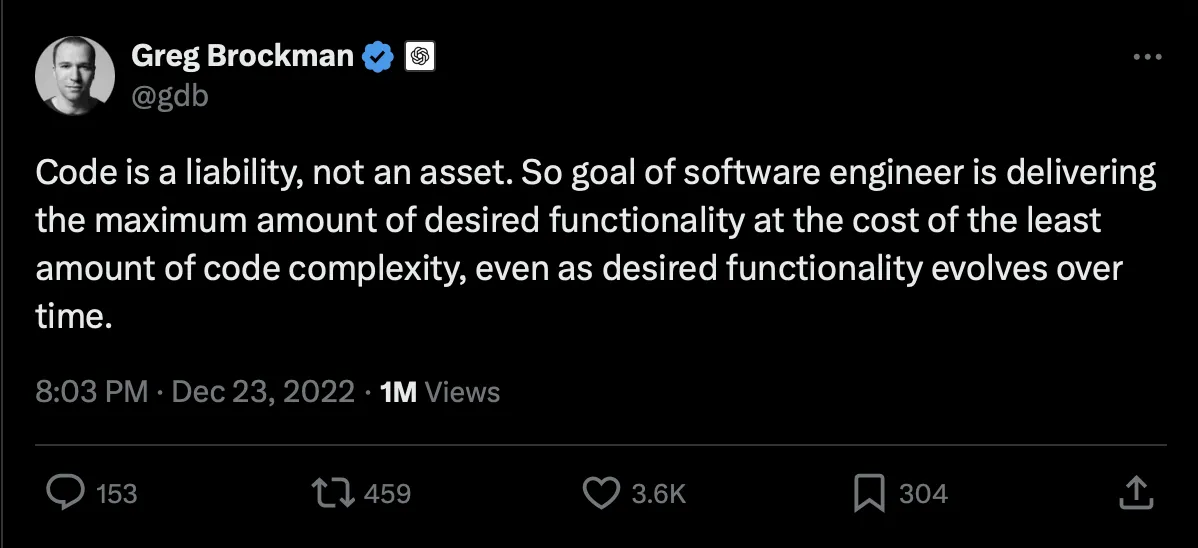
As a software developer, this concept can be challenging to accept. Many of us believe the code we write is the greatest thing since sliced bread. Other developer's code may be a liability, but never mine!
However, anyone who has deployed production software knows that the maintainability, readability, and traceability of the code are often worth just as much, if not more, than its functionality and performance. Especially at 2:30AM when prod is a raging dumpster fire.
Automating standards enforcement, maximizing code readability, style consistency, and minimizing complexity set the code up for long-term success. Not only for other developers who may begin contributing to the project, but for a future version of yourself, who will sleep many nights between the day you author the code and the day you are forced to review the code.
With that in mind, let's dive into the production pipeline!
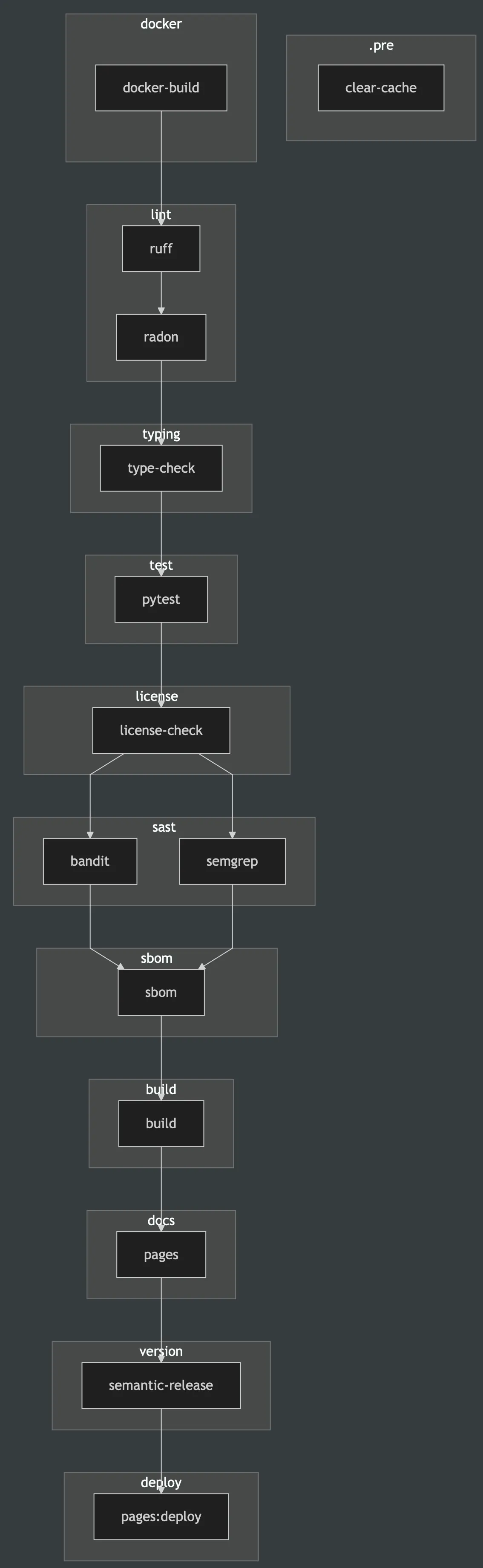
1. .pre
1.1 clear-cache
This job is manually run and clears the cache of any previous artifacts. This is useful for freeing up space and rerunning the pipeline without artifacts.
2. docker
2.1 docker-build
This job builds a Docker image from the repos uv.lock file. Pretty much all of my Dockerfile are of form:
FROM arm64v8/python:3.11-slim-bookworm

LABEL maintainer="taj"
LABEL description="my package"

# Set environment variables
ENV PYTHONDONTWRITEBYTECODE=1 \
    PYTHONUNBUFFERED=1 \
    UV_CACHE_DIR=/root/.cache/uv \
    UV_LINK_MODE=copy \
    PATH="/app/.venv/bin:$PATH" \
    VIRTUAL_ENV="/app/.venv"

# Install system dependencies (curl needed for syft/grype install, pandoc for nbsphinx)
RUN apt-get update && apt-get install -y --no-install-recommends \
    curl \
    pandoc \
    && rm -rf /var/lib/apt/lists/*

# Install uv
RUN pip install --no-cache-dir uv

# Install Syft for SBOM generation
RUN curl -sSfL https://raw.githubusercontent.com/anchore/syft/main/install.sh | sh -s -- -b /usr/local/bin

# Install Grype for vulnerability scanning
RUN curl -sSfL https://raw.githubusercontent.com/anchore/grype/main/install.sh | sh -s -- -b /usr/local/bin

# Set working directory
WORKDIR /app

# Copy dependency files
COPY pyproject.toml uv.lock ./

# Install all dependencies (base + all groups)
RUN uv sync --frozen --all-groups

# Default command
CMD ["/bin/bash"]
I build for arm64v8/python:3.11-slim-bookworm architecture because my GitLab runner is running on a Raspberry Pi. It's trivial to swap this for something like AMD64 if I want to deploy to AWS. Building the image in the first step and pulling it in subsequent stages reduces image pull time because the image is cached and repulled locally, rather than having to build the Docker image fresh for each stage.
3. lint
3.1 ruff
ruff is an insanely fast Python linter written in Rust. I use it to enforce Google code style with the following additions to my pyproject.toml:
[tool.ruff.lint]
select = ["D", "I", "F"]

[tool.ruff.lint.pydocstyle]
convention = "google"

[tool.ruff.lint.isort]
known-first-party = ["my_package_name"]
This configuration replaces black, isort, and flake8 and runs 100x faster. Its purpose is to enforce style consistency from repo to repo.
3.2 radon
radon is a Python package that outputs a score of a repo's Maintainability Index and Cyclomatic Complexity. radon outputs these scores per class and function in the US Traditional Letter Grading System (A, B, C, D, F, where A is "best" and F is "worst"). I configure the job to fail if the Maintainability Index for any class or function falls below an "A" or if the Cyclomatic Complexity falls below a "B".
This enforces modularity, code documentation, and prevents any single function from acting as a "switch" with too many if statements.
4. typing
4.1 type-check
Type checking falls into two categories: static and dynamic. ty is another astral-sh package written in Rust that performs static type checking insanely fast. Static type checking provides an upfront check that every class and function is PEP 484-compliant. I extend my pyproject.toml with the following entries to be Google code style compliant:
[tool.ty.environment]
python-version = "3.11"
root = ["my_package_name"]

[tool.ty.src]
include = ["my_package_name"]
exclude = ["tests", "*.ipynb"]
respect-ignore-files = true

[tool.ty.rules]
# JAX/Chex/Flax relaxations (incomplete type stubs)
unsupported-operator = "ignore"  # JAX arrays lack operator type stubs
invalid-return-type = "ignore"  # JAX Array vs float/int mismatches
invalid-argument-type = "ignore"  # JAX array type mismatches
invalid-assignment = "ignore"  # JAX array assignments
unknown-argument = "ignore"  # Flax struct.dataclass fields
unresolved-import = "ignore"  # Some JAX/internal imports
unresolved-attribute = "ignore"  # JAX array attributes

# Type resolution (relaxed for JAX ecosystem)
unresolved-reference = "warn"
unresolved-global = "warn"
possibly-unresolved-reference = "warn"
possibly-missing-import = "warn"
possibly-missing-attribute = "ignore"

# Type safety (keep some checks)
invalid-type-form = "error"
invalid-type-arguments = "error"
call-non-callable = "warn"
non-subscriptable = "ignore"  # JAX arrays are subscriptable at runtime
not-iterable = "warn"

# Method and class correctness (Google: proper inheritance)
invalid-method-override = "error"
invalid-base = "error"
invalid-metaclass = "error"
override-of-final-method = "error"
subclass-of-final-class = "error"
conflicting-declarations = "error"
conflicting-metaclass = "error"

# Function signature errors (relaxed for JAX)
missing-argument = "warn"
too-many-positional-arguments = "warn"
parameter-already-assigned = "error"
positional-only-parameter-as-kwarg = "error"
invalid-parameter-default = "warn"

# Runtime safety
division-by-zero = "error"
index-out-of-bounds = "warn"
invalid-context-manager = "error"
invalid-exception-caught = "error"
invalid-raise = "error"

# Type annotation quality
byte-string-type-annotation = "error"
fstring-type-annotation = "error"
raw-string-type-annotation = "error"
implicit-concatenated-string-type-annotation = "error"
invalid-syntax-in-forward-annotation = "error"

# Code quality
redundant-cast = "warn"
unused-ignore-comment = "warn"
deprecated = "warn"

[tool.ty.terminal]
output-format = "full"
error-on-warning = false
The ty invoke will fail if any errors are raised.
5. test
5.1 pytest
pytest is used to invoke my unit and integration tests. I like it because it exposes fixtures and includes a rich ecosystem of plugins to extend its functionality, enabling measurement of code runtime and package coverage. I configure my CI/CD job to fail if coverage falls below 75%. This guarantees that the code I deploy is thoroughly tested and minimizes surprises for stakeholders.
6. license
6.1 license-check
Part of developing software is ensuring that the package you provide complies with applicable licensing requirements. Commercial software must be licensed to permit commercial use. GPL licenses, in particular, can be very problematic for commercial use. My license-check job uses the pip-licenses package and an allowed_licenses argument to perform this check.
7. sast
7.1 bandit
bandit is a package used to perform static security scans of your Python code. It works by scanning the code's abstract syntax tree (AST) for patterns that match known vulnerabilities, such as hardcoded passwords, SQL injection flaws, or the use of insecure functions.
7.2 semgrep
semgrep is another open-source static application security testing framework that finds vulnerabilities, secrets, and quality issues in code using configurable rules. I stack semgrep with bandit because semgrep also finds vulnerabilities in open-source dependencies by analyzing manifest/lock files and checking reachability. It doesn't just search for insecure code; it also checks whether the insecure code is executed/executable anywhere.
8. sbom
8.1 sbom
Having a Software Bill of Materials (SBOM) readily available is required in heavily regulated industries such as defense, healthcare, and banking. syft is a Go package with a CLI that enables SBOM generation in the two most popular formats: CycloneDX and SPDX. SPDX is preferred by the legal department, whose focus is on license compliance, while CycloneDX is preferred by security teams looking to identify vulnerabilities in dependencies. I follow up the generation of the CycloneDX SBOM by scanning the OS and dependencies for vulnerabilities using the grype package. The focus of grype is on OS-related vulnerabilities; when coupled with the sast stage, it provides a complete picture of a repo's security posture, from the base Docker image through dependencies to first-party code.
9. build
9.1 build
Once my repo passes ruff, radon, type-check, pytest, license-check, semgrep, bandit, and sbom, it is time to package the code up into a .whl file. I use uv build --wheel to package up the code for distribution.
10. docs
10.1 pages
Because I enforce strict Google code style, docstrings, and typing, it is trivial to generate comprehensive documentation with the sphinx package. This generates a beautiful GitLab Pages site for my project, with the most up-to-date documentation for every commit.
As far as organization goes, I set up a CI/CD Catalog project in GitLab to reuse components across all my projects. That way, individual pipeline jobs are defined only once and are much easier to maintain than managing separate CI/CD job definitions for the same functionality across multiple projects. Is it overkill for personal projects? Probably. Do I like having a single place to make changes that automatically propagate everywhere? Hell yeah!